You may have already noticed that site navigation style have changed on newly created SharePoint Online communication sites. Experience is currently different on sites created earlier.
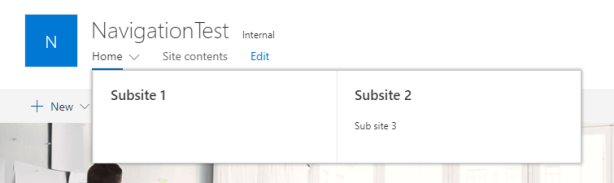
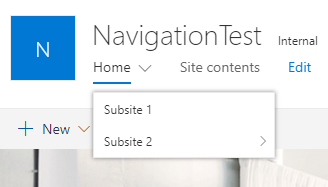
Here is a quick-n-dirty PowerShell script to change experience back to old style navigation on newly created communication sites.
[System.Reflection.Assembly]::LoadWithPartialName("Microsoft.SharePoint.Client") | Out-Null
[System.Reflection.Assembly]::LoadWithPartialName("Microsoft.SharePoint.Client.Runtime") | Out-Null

$webUrl = "<site url>"
$username = "<username>@<tenant>.onmicrosoft.com"
$pw = read-host -Prompt "Enter password" -AsSecureString

$ctx= New-Object Microsoft.SharePoint.Client.ClientContext($webURL)
$ctx.Credentials = New-Object Microsoft.SharePoint.Client.SharePointOnlineCredentials($username,$pw)
$ctx.Load($ctx.Web)
$ctx.ExecuteQuery()
$ctx.Web.MegaMenuEnabled = $false //Disables megamenu experience
$ctx.Web.Update()
$ctx.ExecuteQuery()
Edited 22.8.2018 17.33:
Of course you can do it with PnP PowerShell.
Connect-PnPOnline -Url <yoursite>
$web = Get-PnPWeb
$web.MegaMenuEnabled = $false //$false to disable, $true to enable
$web.Update()
Invoke-PnPQuery
Discover more from Enabling the Future of Work with Matti
Subscribe to get the latest posts sent to your email.
 Enabling the Future of Work with Matti
Thank you for writing thiis
LikeLike